
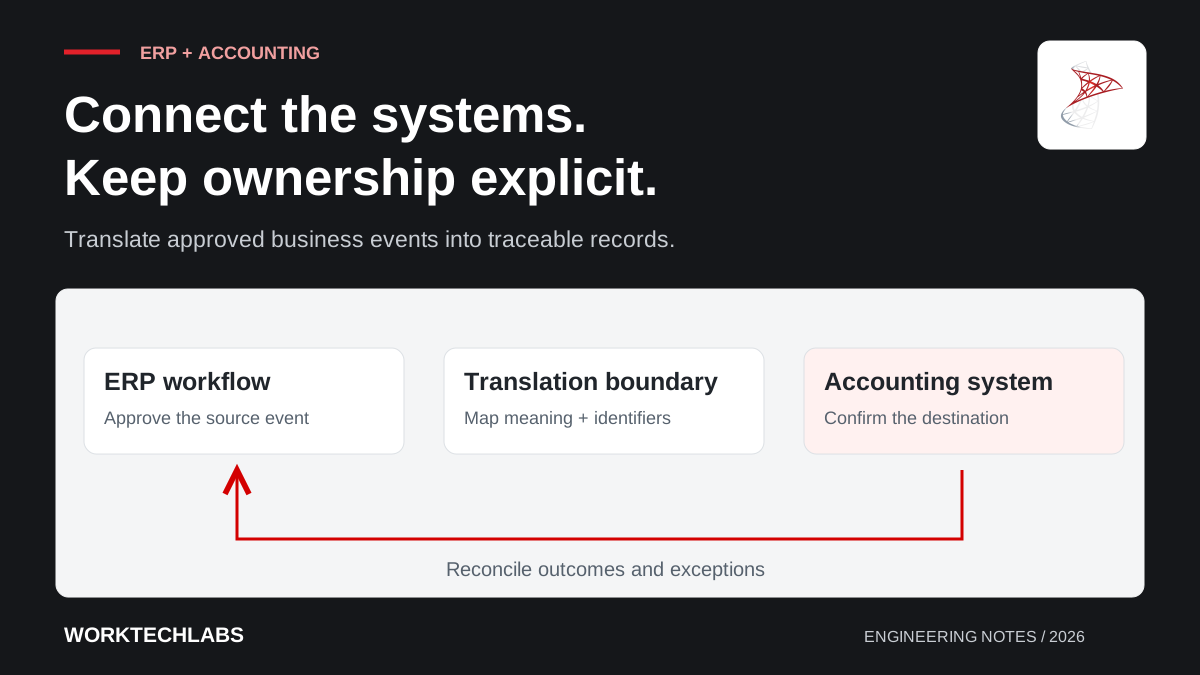
Connecting an ERP to accounting software can remove repeated data entry and improve visibility across the business. It can also create confusion if both systems believe they own the same record, an integration repeats a document or a failed transfer remains invisible until someone notices a discrepancy.
The design needs to explain which business events cross the boundary, what each system considers authoritative and how staff resolve exceptions. Technical connectivity is only the starting point. A useful integration provides a consistent, traceable relationship between operational activity and the records maintained in the accounting system.
Choose the boundary around business events
Start by listing the events that need to cross systems. An approved invoice, a new supplier or a payment-status update may each have different timing and ownership. Avoid assuming that every table in one product should be synchronised with a similar table in the other.
Agree when information is ready to transfer. A draft transaction may change repeatedly, while an approved document may require a controlled correction process. The finance and operations owners should define those rules before engineers decide which API endpoint to call.
For a hypothetical distributor, order processing might remain in the ERP while approved invoice documents are submitted to the accounting platform. Payment information could then return through a separate, clearly defined workflow. This example illustrates a boundary; it does not prescribe how every business should organise its records.
Assign ownership to every shared field
Define which system owns customer details, supplier references, document status and other shared information. Ownership can differ by field or stage of the workflow, but the rules must be clear enough to resolve a disagreement. “Keep both sides in sync” is not a conflict-resolution policy.
Use stable identifiers to connect records. Names and display numbers can change, and two customers may have similar descriptions. Store the external identifier alongside the internal record and record any mapping decisions that require business review.
Decide how changes propagate. If an accounting user corrects a customer record, should the ERP receive the change, reject it or preserve separate values for different purposes? Explicit ownership prevents well-intentioned updates from repeatedly overwriting each other.
Translate meanings rather than copying shapes
Similar fields can represent different concepts. A status called “complete” may mean operational work is finished in one application and a document has been posted in another. Date fields, currency handling and line-item structures also need careful interpretation by the relevant business specialists.
Use a translation boundary that keeps each application's internal model understandable. Microsoft's Anti-Corruption Layer pattern describes separating models through an adapter. In this setting, that adapter can make external mappings explicit instead of spreading supplier-specific assumptions throughout the ERP.
Version and test the mappings. Include representative corrections, partial cases and optional fields rather than only an ideal document. The technical implementation should follow approved business rules; it should not invent accounting treatment when source information is ambiguous.
Make submission safe to repeat
Give each transfer a stable identity and track its state. If a request times out after the external system accepted it, the integration needs a way to discover the result before submitting it again. Where supported, use the provider's duplicate-protection mechanism and retain the corresponding identifiers.
Distinguish a retry of the same document from a new revision or correction. Reusing an identity for changed content may be rejected or produce an unclear result, depending on the external contract. Record the approved document version and the payload used for submission.
Keep a durable history of attempts and outcomes. Staff should be able to see whether a document is waiting, accepted, rejected or requires investigation. Avoid a single boolean “synced” field that cannot explain why a transfer failed or what should happen next.
Provide an exception workflow for the people who resolve it
Classify failures by the action required. An unavailable API may be retried automatically within limits. An unknown reference or inconsistent document may need a business correction. A permission problem may require the integration owner. Route each class to someone able to resolve it.
Show useful context in the exception queue: the internal document, the external response, the attempted version and the permitted next action. Keep sensitive credentials and unnecessary payload details out of the interface. The operator needs evidence, not every byte of a technical log.
Make corrections traceable. Record who changed the source information, why the transfer was retried and which result was accepted. If the correction must happen in the accounting system, make that ownership explicit so staff do not create competing fixes in both applications.
Reconcile the business outcome regularly
Compare the expected set of transferred documents with the records acknowledged by the destination. Review unmatched items, duplicate references and relevant totals using definitions agreed with finance. A successful HTTP response alone cannot establish that the entire business process is complete.
Account for timing differences. Some destinations process accepted documents asynchronously, and a status update may arrive later. A reconciliation report should distinguish pending work within its expected window from items that have exceeded that window and need attention.
Include cancellations and corrections in the design. Removing a record from one system may not be the correct action in the other. The business owner must define the supported lifecycle, and the integration should preserve the evidence connecting each change to its originating event.
Plan the cutover and the continuing relationship
Before go-live, agree which existing records are transferred and which remain historical. Establish a clear starting boundary so manual submissions and automated transfers do not overlap unexpectedly. Rehearse the process with representative documents and confirm the reconciliation results with the people responsible for them.
Assign ownership for monitoring, credential changes and provider API updates. An integration is a maintained business dependency, so include it in support planning rather than treating it as complete once the first document arrives successfully.
Worktechlabs designs ERP systems and application integrations around clear data ownership and verifiable outcomes. The companion guide to resilient API integrations explains the delivery mechanics that help keep a temporary connection problem from becoming a duplicated or missing business record.
