
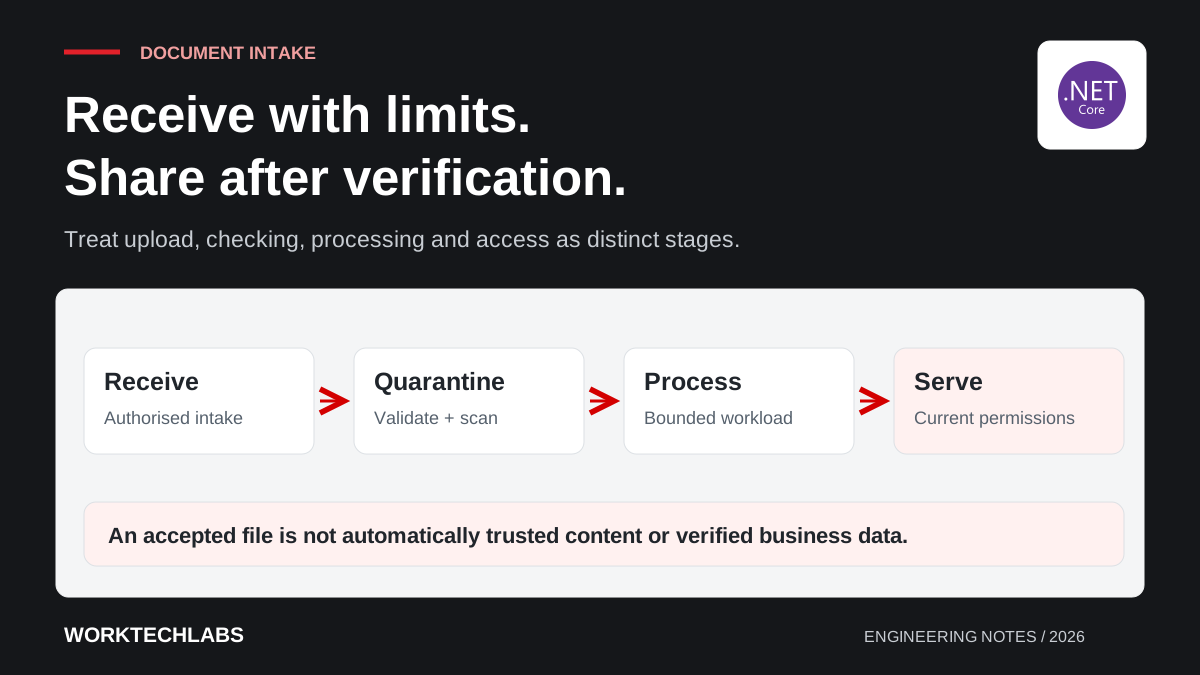
A customer portal needs a place to upload invoices, photographs or supporting documents. The visible feature is simple: choose a file and press a button. The application then becomes responsible for receiving untrusted content, storing it, deciding who may access it and potentially sending it through scanners, parsers or AI services.
The upload should therefore be designed as a document workflow with explicit states. “Received” is not necessarily “checked”, and “stored” is not necessarily “available to everyone who knows the address”. Clear boundaries protect the application while helping users understand when their evidence is ready for the next step.
Define the purpose and permitted content
Start with the business use. A supplier invoice, a field photograph and an import spreadsheet have different processing needs and risks. List the required formats, size limits and relevant downstream operations. Avoid enabling a broad collection of file types simply because the browser can select them.
For a hypothetical maintenance portal, technicians may submit photographs while office staff attach PDF reports. Establish whether files are evidence to preserve, content to display or inputs to extract. Those purposes influence validation, transformation, retention and the way a reviewer should see the original material.
Microsoft's upload guidance and OWASP's file-upload material describe risks and implementation precautions. Use them to review the full path from request to later access, rather than treating extension validation as the entire design. ASP.NET Core file uploads and OWASP file-upload risks.
Establish an intake boundary
Authenticate and authorise the upload where the workflow requires it. Verify the user's relationship to the destination record, such as the maintenance job or supplier account. Knowing a valid job identifier should not be sufficient to attach material to another customer's work.
Use server-controlled storage identifiers. Treat the submitted filename and content-type declaration as untrusted metadata, and validate the actual content using an approach suitable for the accepted formats. Keep any original filename only where it has a legitimate display or audit purpose and handle it safely in that context.
Bound the resources the operation can consume. Consider individual size, total user allocation, request duration and concurrent work, including downstream processing. A technically valid file can still create an operational problem if the system allows unlimited submissions or performs expensive parsing without appropriate limits.
Keep unverified files out of ordinary publication
Introduce an intake state in which the file has been received but is not yet available for general use. Store it in a location and access model suitable for untrusted content. Decide which checks must complete before the application permits viewing, downloading or further processing.
If scanning or validation is asynchronous, show a meaningful pending state and record the result. A scanner being unavailable should not silently become an approval. Define the failure policy for the business workflow, including whether a user may replace the file or whether support must investigate.
Preserve the relationship between the checked content and the content later served. If a transformation creates a preview or a normalised document, track that derivative separately. Avoid a workflow in which a file can change after verification while retaining an earlier approval state.
Design access through the application boundary
Decide who may retrieve the file and for how long. For customer documents, access should normally reflect the owning record and current permissions. A difficult-to-guess URL can reduce accidental discovery, but it should not be treated as the only access decision for material that requires protection.
Consider whether the file should be displayed inline or downloaded, and configure the serving behaviour appropriately for its type and purpose. Review previews and thumbnail services as part of the same boundary. A protected original is insufficient if its generated preview becomes publicly accessible elsewhere.
Test changes in access after upload. A technician may leave the project, a customer account may be suspended or a document may be withdrawn. The application's retrieval and sharing mechanisms should respond according to the chosen policy, including any temporary access links already issued.
Treat parsers and extraction as separate processing steps
An accepted upload may still fail during document parsing, image transformation or data extraction. Give these steps their own states and resource limits. Keep processing libraries maintained and avoid granting them more access than the task requires.
When extracted information drives a business action, validate it against the relevant rules. A document reader can produce a plausible invoice number or amount that is wrong. The upload's acceptance does not establish the correctness of every interpretation made from its contents, including interpretations produced by an AI feature.
For the maintenance portal, keep the submitted report available to an authorised reviewer when an extracted value is uncertain. Provide a correction path that records the reviewed value without overwriting the evidence casually. This makes the document workflow useful during support and later reconciliation.
Own retention, failures and user feedback
Tell users which stage their file has reached and what they need to do next. Distinguish rejected format, excessive size, failed processing and temporary service problems. Preserve a useful reference for support without exposing internal storage paths or sensitive diagnostic details.
Define cleanup for abandoned uploads, rejected files and generated derivatives. Ensure retention decisions match the business purpose and account for unfinished processing. A scheduled deletion should not remove material that a user was told had been accepted and was still required for an active task.
Worktechlabs can help implement document handling in business portals and AI extraction workflows. Treat receiving, checking, processing and sharing as distinct responsibilities, then verify the full journey with both valid documents and controlled failure cases so the feature remains dependable beyond the upload button.
Official sources and further reading
- Microsoft: file uploads in ASP.NET Core — upload handling and implementation considerations.
- OWASP Foundation: unrestricted file upload — risks and defensive design considerations.
