
A dispatch coordinator keeps refreshing a page to learn whether a driver has accepted a job. A warehouse supervisor asks colleagues to reload the order list after each change. These are useful signs that the interface may be forcing people to discover information that the system already knows has changed.
Real-time updates can improve that experience, but they should serve a decision. A constantly moving dashboard can also distract users, waste capacity or create false confidence about the freshness of its data. The design question is which changes need immediate attention and what a user should do when an update cannot be delivered.
Choose the event that changes a decision
Start with one operational workflow and identify the moment at which new information matters. In a hypothetical delivery business, a driver accepting an urgent collection changes the coordinator's next action. A revised description on a historical job may not need to interrupt anyone immediately.
Classify updates by consequence. Some should update a visible status quietly, some should notify a particular person, and some should remain in a normal history view. This avoids giving every database change equal prominence simply because the application can broadcast it.
Specify a tolerable delay and a recovery behaviour for each important update. These are product decisions, not merely transport settings. A customer tracking page may tolerate occasional delay while a shared dispatch board needs a visible indication when its connection is stale. Write down what the user can safely conclude from the screen.
Use SignalR for communication, with a clear source of truth
ASP.NET Core SignalR supports communication in which server code pushes updates to connected clients. Microsoft's overview describes its hub model and available transports. That makes it a useful candidate for interactive operational interfaces, while the underlying business record still needs its normal persistence and validation. SignalR overview.
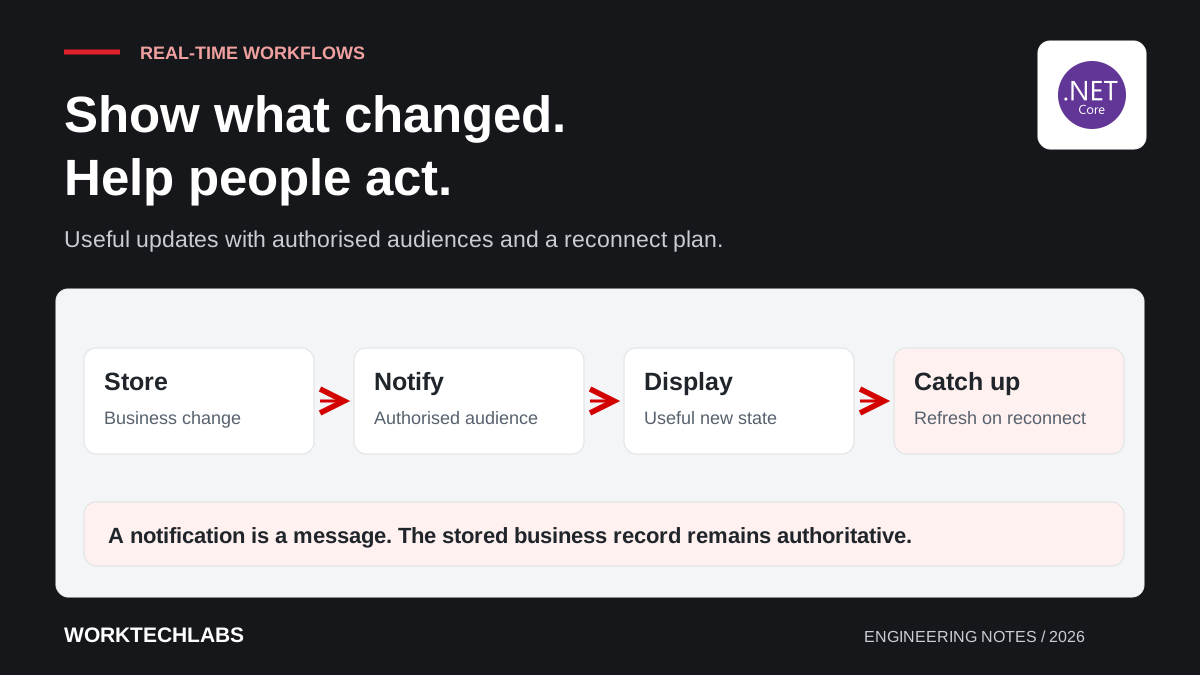
For the dispatch board, store the accepted assignment through the application service, then notify authorised viewers that the job changed. Decide whether the notification carries sufficient display data or tells the client to retrieve the latest authorised state. Keep the contract small and purposeful rather than broadcasting an entire database entity.
Distinguish a notification from a completed business operation. A message appearing on a browser is not proof that another employee acknowledged it, and a missing message is not proof that the assignment failed. Those states need separate records when they matter to the workflow.
Design reconnect and catch-up behaviour
A browser can lose connectivity, sleep or close while the business continues working. Decide what happens when it returns. For many dashboards, fetching a fresh snapshot is more dependable than assuming every intermediate notification was received. More demanding workflows may need a durable change history and an explicit continuation position.
Use record versions or another suitable ordering mechanism when updates could arrive late. A delayed status should not overwrite a newer state already shown. Define the rule at the application level and test it with deliberately reordered events instead of assuming a fast local demonstration represents production conditions.
Show connection state in language users understand. A quiet indicator such as “Updates paused; reconnecting” is useful when accompanied by a safe next step. Avoid leaving the last known state looking authoritative indefinitely. If an action requires current information, validate it on the server even when the displayed value looks recent.
Keep the audience boundary explicit
Decide which users may receive each event. A warehouse team may need its own locations, a customer only their deliveries, and an administrator a broader operational view. Membership in a convenient broadcast group should follow the application's access rules rather than replace them.
Microsoft explicitly states that SignalR groups are not a security feature. Use authentication and authorisation, and implement the required membership and revocation behaviour. SignalR users and groups.
Test a user whose permissions change while connected. Include attempts to request another customer's group or supply an unexpected record identifier. Review payloads for unnecessary information as well: a status notification rarely needs customer contact details, internal notes and every field associated with the record it describes.
Make a busy interface usable
Consider what happens while someone is reading or editing. A live update that moves rows around can cause the wrong item to be selected. Prefer predictable behaviour, such as marking that new information is available or updating a status without unexpectedly changing the user's current context.
Group repetitive notifications where the business meaning permits it. If a bulk import updates hundreds of records, users may need a completion summary rather than hundreds of interruptions. Decide how that summary relates to individual failures so convenience does not hide exceptions that require action.
Include accessibility in the interaction design. Important updates should be discoverable without relying only on colour or motion, while routine updates should not overwhelm assistive-technology users with repeated announcements. Test the interface during a realistic burst of activity, including when a dialog or form already has focus.
Measure the workflow after introducing live updates
Compare the operational experience before and after the change. Useful measures might include manual refreshes, duplicated assignments, time to notice an exception and support reports of stale information. A large number of delivered notifications is a technical activity measure, not evidence that the business works better.
Exercise the system under representative connection counts and event rates. Include slow clients and reconnect bursts, then establish which operational signals indicate trouble. Give support a way to distinguish a delayed notification from an unchanged business record so incidents do not become guesswork.
Worktechlabs can help introduce real-time capabilities into business applications and portals. Start with the update that changes a person's next decision, retain a dependable record of the underlying transaction, and connect the rollout to observability so the team can verify that the new experience remains useful.
Official sources and further reading
- Microsoft: SignalR overview — server-to-client communication capabilities.
- Microsoft: SignalR users and groups — audience management and its security limits.
- Microsoft: SignalR authentication and authorisation — protecting hubs and operations.
