
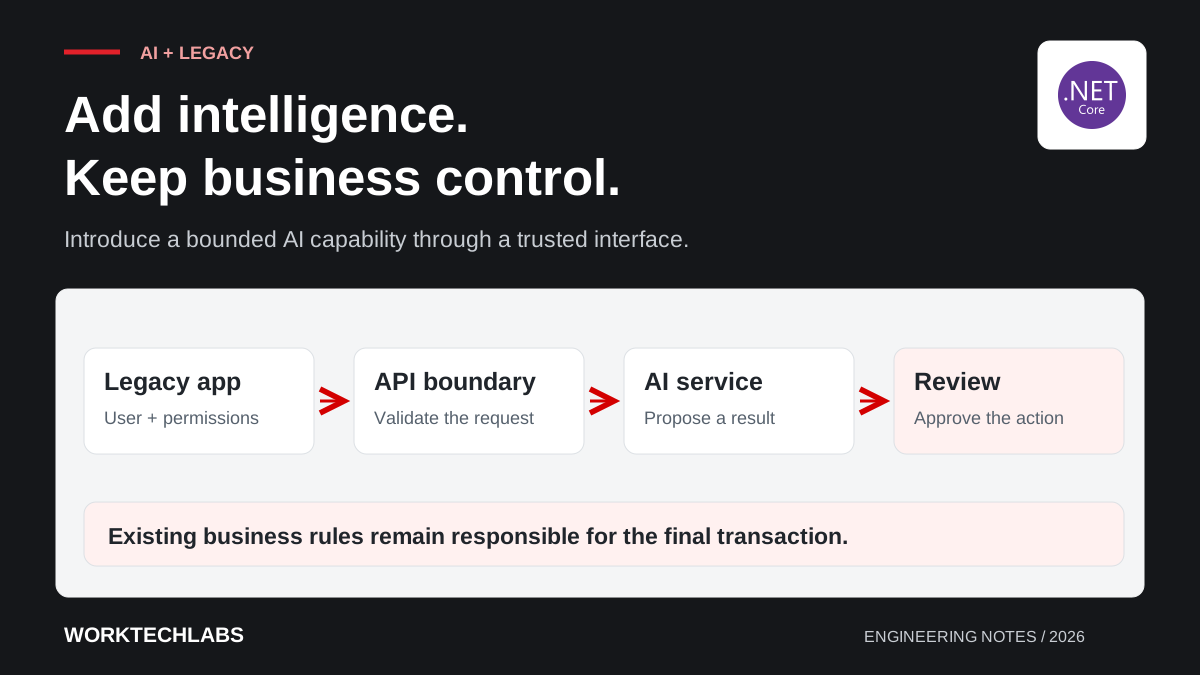
A legacy application can be a useful place to introduce AI because it already contains the workflows people depend on. Staff know where records belong, which approvals are required and how exceptions are handled. The opportunity is often to reduce a specific piece of manual work inside that process, rather than replace the whole application with a new interface.
The challenge is connecting a probabilistic component to software built around explicit rules. A model may produce a useful summary, an incomplete answer or a plausible mistake. The integration needs to preserve the application's permissions and validation while giving users a clear way to inspect the result. This can be done incrementally, provided the first use case has a manageable boundary.
Select one task with an observable result
Start with an activity that staff can describe and verify. Examples include extracting proposed fields from a supplier document, summarising a case history or finding relevant internal guidance. The task should have accessible source information and a practical way to determine whether the output helps.
Avoid beginning with an open-ended request for an assistant that can do everything. Such a request combines search, reasoning, permissions and actions before the team has established how any one part will be assessed. A narrow task makes it possible to identify missing information and test the user experience before expanding the scope.
Consider a hypothetical purchasing system where staff manually copy details from delivery documents. A first feature could suggest a delivery reference, date and quantities for review. It should not automatically change stock levels. The proposed fields and their source locations give the reviewer something concrete to check.
Place an integration boundary around the AI capability
Keep model access in a separate application service or component with a defined contract. The legacy application sends a permitted request, and the integration returns a structured result or a clear failure state. This boundary can protect the older codebase from provider-specific details and make the new capability easier to test independently.
For an older .NET Framework application, a modern service can expose a controlled HTTP API without requiring an immediate migration of every screen. The contract should define authentication, timeouts, input limits and versioning. It should also define what the calling application displays when processing is unavailable.
Choose synchronous or asynchronous processing according to the task. A short summary may fit an interactive request, while a large document import may need a job identifier and status page. Do not leave a user staring at a spinning indicator with no explanation of whether it is safe to retry.
Keep permissions outside the prompt
An instruction telling the model to respect permissions is not an access-control system. The trusted application must establish the user, determine what information they may access and enforce that decision when retrieving records or executing actions. The model should receive only the information permitted for the task.
For document search, access needs to remain correct as users, groups and documents change. Microsoft's document-level access control guidance describes supported approaches in Azure AI Search. The implementation still needs testing against the application's identity model, including removed access and cross-customer isolation where relevant.
Treat retrieved documents and user-supplied text as data, even when they contain instructions. A document that says “ignore previous rules” must not gain authority over the application. Limit available tools, validate action arguments and keep authorisation in server-side code so unexpected model behaviour cannot bypass ordinary business controls.
Validate structured output before using it
Structured output makes integration easier, but a correctly shaped response can still contain incorrect values. Validate required fields, allowed categories, formats and relationships. If a document proposes a supplier identifier, confirm that the supplier exists and is valid for the operation. If quantities must be non-negative, enforce that rule in the application.
Preserve uncertainty rather than filling every missing value with a guess. The review interface should distinguish extracted information, inferred suggestions and fields requiring manual entry. Where possible, display the source page or text so the reviewer can check the result without searching through the document again.
Keep the original business rules in charge of the final transaction. The same validation should apply whether values were typed by a person, imported from a file or proposed by an AI feature. Adding a new input route should not create a quieter path around controls the business already relies on.
Build the evaluation set from real work
Gather representative examples with appropriate permission and handling controls. Include clean cases, unusual layouts, missing information and cases that should be rejected. Have knowledgeable staff label the expected results and record ambiguities rather than forcing a single answer where the business rule is unclear.
Evaluate the whole integration: retrieval, extraction, validation, review and final application behaviour. A good model result is insufficient if the integration associates it with the wrong customer record. Include tests for users with different access, repeated submissions and unavailable dependencies.
Measure field-level errors and task completion rather than relying on a single impressive average. A wrong delivery note description and a wrong stock quantity have different consequences. Our article on evaluating document extraction provides a starting point for building evidence before production use.
Design human review as real work
Human review only helps when the reviewer has time, context and an understandable interface. Show the proposed values beside their evidence, highlight missing or conflicting information and make corrections straightforward. A single approve button beneath a long generated answer can encourage superficial checking.
Record what was proposed, what the reviewer changed and what was finally saved. Use the correction patterns to improve the system and the evaluation set. Do not assume that every human edit proves a model failure; a reviewer may have information that was never supplied to the feature.
Define a route for difficult cases. The system should be able to send a document to manual processing without losing its status or forcing staff to start again. A controlled fallback makes the integration useful on ordinary cases while keeping exceptions manageable.
Control retries, cost and failure behaviour
Assign a stable identifier to each processing job and make repeated requests safe. If the browser times out after the server accepted a job, a retry should find or resume that job rather than creating duplicate business effects. Keep model processing separate from the final transaction until the result passes the required checks.
Set limits on document size, processing time and retry count. Record enough telemetry to understand latency, failures and cost per completed task. Provider charges are only part of the operating cost; include retrieval, storage, review time and support effort when deciding whether the feature is worthwhile.
Plan for provider unavailability or a model update that performs poorly on your documents. Keep a manual route, preserve the last approved configuration where feasible and evaluate replacements before switching. The integration boundary should make those decisions possible without rewriting the surrounding workflow.
Roll out the capability in stages
Begin with a small group of users and a clearly defined class of work. Compare the new process with the current one, including review time and correction effort. Expand only when the evidence supports the next step, and keep an owner responsible for ongoing performance.
The first release should leave the legacy application more useful and easier to understand. It should also produce knowledge about the data, permissions and workflow that can inform later modernisation. Worktechlabs can help design AI integrations and system interfaces that introduce a bounded capability while keeping existing business operations in control.
