
A legacy application often holds a business together long after its original architecture stops being comfortable to maintain. It knows how quotations are approved, which customers receive special terms and what happens when an order arrives incomplete. Replacing its screens is straightforward compared with replacing that accumulated knowledge.
For a business planning a migration, the first question should be what needs to improve. Perhaps releases take too long, a dependency is approaching the end of support, or a customer portal cannot cope with demand. Each problem suggests a different first step. A credible roadmap connects technical work to those pressures and creates opportunities to check progress before the whole business depends on the replacement.
Define the outcome before selecting the destination
Write a short migration brief that an operations manager and a developer can both understand. Identify the affected workflow, the current limitation, the desired outcome and the evidence that will demonstrate improvement. “Move to Azure” describes a location. “Allow the service team to release portal changes without interrupting order processing” describes a result worth designing for.
Separate unavoidable work from optional improvement. An unsupported library might demand immediate replacement, while a confusing report can wait. A migration can include a better user experience, but combining every requested feature with a platform change makes it harder to identify why behaviour has changed. Keep a visible list of improvements deferred until the new foundation is stable.
Agree constraints explicitly: acceptable interruption, busy trading periods, data retention, recovery expectations and the people available to help. These constraints belong in the plan from the beginning. Discovering that finance cannot participate during month end should change the proposed sequence before a cutover date becomes a promise.
Map workflows and dependencies together
An application inventory is useful, but a workflow map reveals what the inventory misses. Follow a real order from entry through approval, stock allocation, invoicing and reporting. Record each system involved, the owner of each step and the files, messages or database queries connecting them. Include scheduled jobs and spreadsheets that staff rely on outside the main application.
For each dependency, ask who reads the data, who changes it and how quickly another system expects to see an update. A nightly report and a live stock check have different requirements. An undocumented export might be more important to daily operations than a prominent dashboard. Interviewing the person who reconciles exceptions can expose dependencies that source code alone will not explain.
Use this map to identify migration boundaries. A boundary should contain enough behaviour to deliver a useful result while limiting the number of connections that change at once. One complete customer lookup journey is often a better pilot than half of every screen in the application.
Choose a migration strategy per workload
Some components can be moved with limited changes. Others need adaptation to their hosting environment, and some deserve replacement because their design blocks the intended outcome. Retaining a stable component temporarily can be reasonable if its support status and operational risk remain acceptable. Avoid treating one migration strategy as a rule for the whole estate.
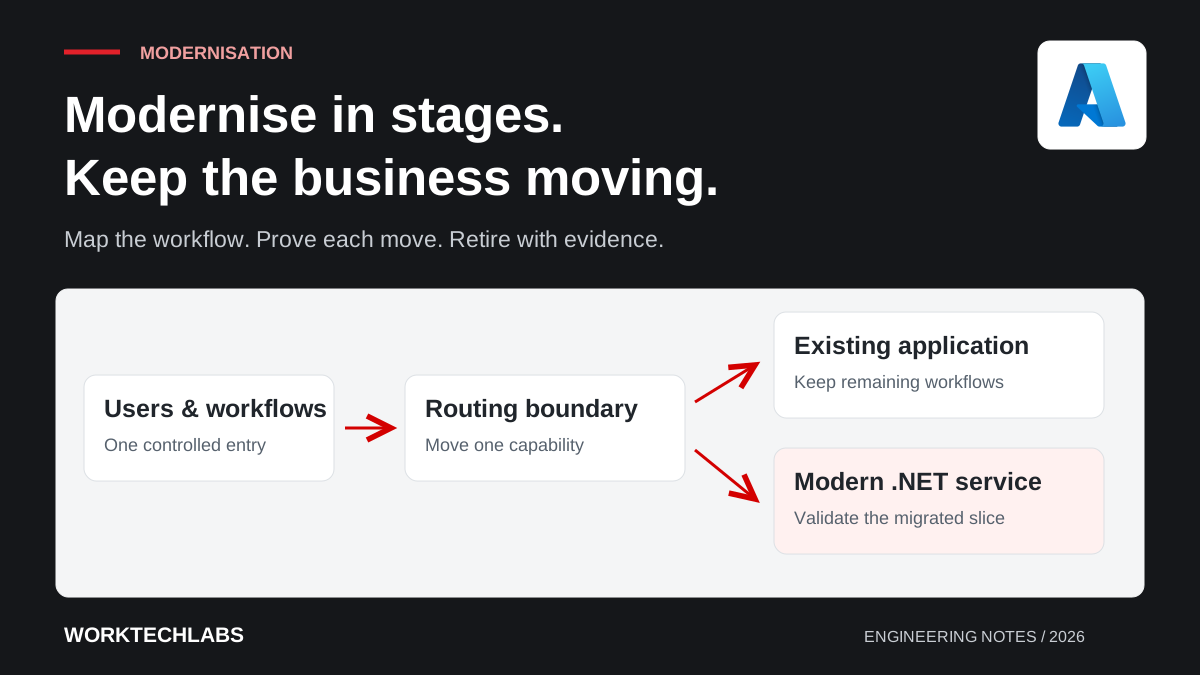
For a larger system, a staged replacement can route selected functions to a new application while the remaining functions stay in the old one. Microsoft describes this approach in its Strangler Fig pattern. The routing boundary makes gradual change possible, but it also becomes infrastructure that needs monitoring and a clear owner.
Consider a hypothetical distributor replacing an ageing order portal. The first release could move read-only order tracking to a new .NET application. Order entry remains in the existing system while the team proves identity, deployment and support arrangements. This is a planning example, not a guarantee that every legacy system can be divided in the same way.
Decide which system owns every write
Data ownership is the part of coexistence that deserves the most attention. If two applications can update the same business record independently, the team must explain how conflicts are detected and resolved. “Synchronise the databases” is incomplete until someone defines ordering, retries, duplicate messages and the authoritative value when updates disagree.
A simpler transition often gives one system responsibility for each kind of write. A new interface can call an existing service until ownership transfers. Where direct database access is unavoidable, document the dependency and its removal plan. Temporary integration has a habit of becoming permanent when nobody owns its retirement.
Plan data checks alongside the transfer. Compare counts, relevant totals, relationships and selected records that represent difficult cases. A matching row count cannot prove that amounts, dates or customer associations survived correctly. Our article on reconciling a data migration explains why evidence about the transferred data matters as much as a successful import.
Capture behaviour before changing it
Legacy behaviour includes intended rules, accidental quirks and workarounds that people have quietly built into their routines. Gather representative examples before implementation. Ask staff for an ordinary transaction, an exception and a case that previously caused a problem. Turn the important examples into checks that can run against both versions.
Do not preserve every old defect by default. When the new system produces a different result, classify the difference: required compatibility, an approved correction or an unexplained regression. The business owner should decide which category applies. Otherwise, engineers can spend weeks reproducing a mistake that nobody wanted to keep.
Test operational behaviour as well as calculations. Check expired sessions, unavailable dependencies, interrupted uploads and repeated submissions. If a user retries an order after a timeout, the new implementation must not quietly create two orders. These cases reveal whether the migration preserves the workflow when conditions are less than ideal.
Rehearse the cutover and the recovery decision
A cutover plan needs named owners, ordered steps, expected durations and explicit decision points. Rehearse it with representative data and record the actual timings. Include configuration changes, background jobs, access checks and business validation. A rehearsal that stops once the application launches leaves the most important questions unanswered.
Define the point after which a simple rollback is no longer possible. Once the new system has accepted writes, returning to an old database snapshot could discard legitimate work. Recovery might require replaying transactions, reconciling records or fixing the new version in place. The plan should distinguish those choices instead of treating an application rollback as a complete recovery strategy.
Give the person making the release decision observable criteria: which journeys must work, what errors trigger a pause and who confirms the data checks. A short, specific decision sheet is more useful during a pressured release than a large document with no clear thresholds.
Budget for coexistence and retirement
The migration budget must cover the period when both systems exist. That includes hosting, duplicated monitoring, integration maintenance and the attention required from business specialists. Track the cost of each temporary component and assign a retirement condition. Otherwise, a successful pilot can leave the business funding two platforms indefinitely.
Retirement is a delivery milestone. Confirm that traffic, scheduled jobs, external integrations and reporting no longer depend on the old system. Decide how historical information will remain accessible and verify restoration or archive access where required. Remove obsolete credentials and infrastructure only after the dependency checks are complete.
The next useful step is a focused assessment of one important workflow: its constraints, dependencies, data ownership and a small migration slice. Worktechlabs can help turn that assessment into a legacy modernisation plan with deliverables the business can review at each stage.
