
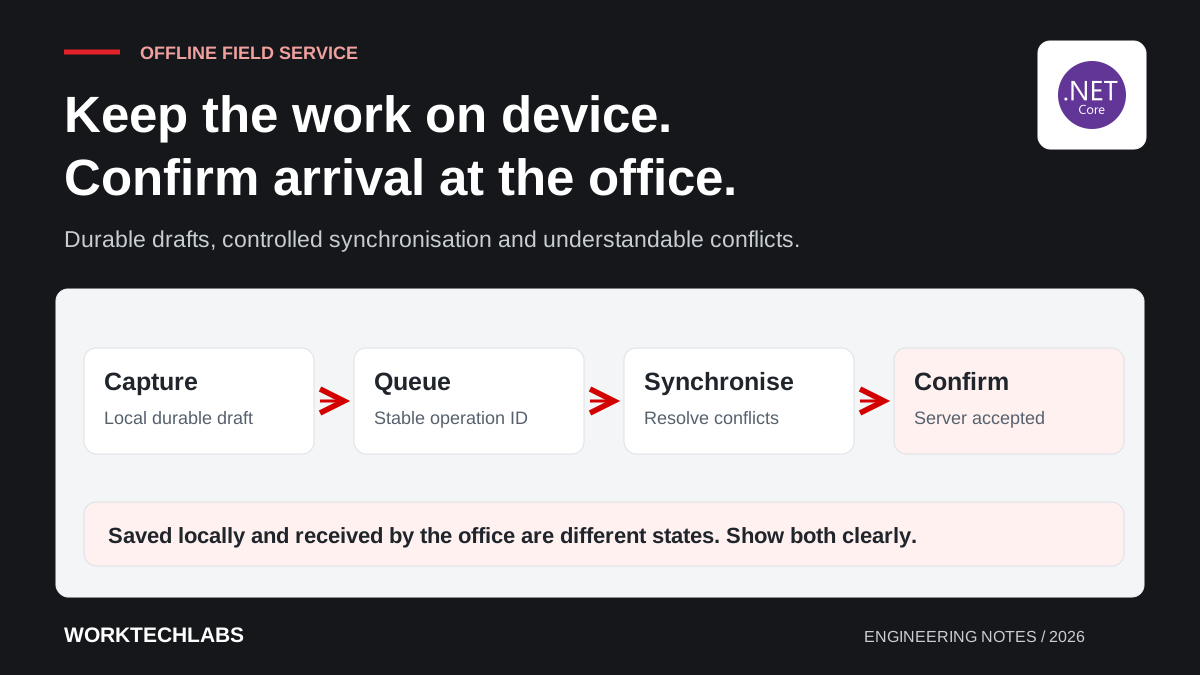
A technician finishes a maintenance visit in a basement plant room, enters the work performed and attaches photographs. The connection disappears before submission completes. If the application cannot explain what was saved, the technician may repeat the entry later or assume the office received information that exists only on the device.
Offline capability is a workflow design problem before it is a storage feature. The application must distinguish local progress from accepted server state, preserve unfinished work and resolve changes made elsewhere. .NET MAUI can be part of the implementation, but a local database alone does not provide a complete synchronisation strategy.
Define which work must continue without connectivity
List the tasks a field worker needs to complete when the network is unavailable. Reading an assigned job, recording measurements and capturing photographs may be essential. Creating a new customer or approving a substantial variation may require a current server decision and can have different rules.
For a hypothetical facilities company, agree which reference data should be available before a visit. Include equipment details, instructions and the minimum customer information required for the task. Avoid downloading an entire operational database simply because local storage is available.
Describe the limits clearly in the interface. A technician should know which actions are recorded locally and which require connectivity. The application can support useful offline work while declining operations that cannot be validated safely with the information available on the device.
Model local drafts and synchronised records separately
Give local work a durable identity as soon as it needs to survive interruption. Record its relationship to the assigned job, its local revision and the server version on which it was based where relevant. That information helps the system recognise a repeated submission and detect changes made elsewhere.
Microsoft documents local SQLite database use in .NET MAUI applications. This provides an implementation option for structured local data, while encryption, device protection, synchronisation and retention require their own design decisions. MAUI local databases.
Make draft state visible. “Saved on this device” and “Received by the office” are different promises. Use language that matches the actual persistence boundary, and retain enough information to recover a submission after the app closes or the device restarts.
Build a deliberate synchronisation queue
Track pending operations with stable identifiers, dependencies and an understandable status. The queue should know which items can be attempted independently and which depend on an earlier action. A photograph linked to a new visit record may need a different sequence from a standalone update to an existing job.
Expect attempts to be repeated. A server can accept an operation while the device loses the response, so the next attempt should be recognisable as the same business request. Define how the client confirms the outcome rather than creating another visit report each time it reconnects.
Use bounded retries and expose persistent failures. A missing reference or rejected permission will not become valid merely because the device keeps trying. Give the user a useful explanation and support a controlled correction path while preserving the original work for investigation.
Decide how competing changes are resolved
Suppose the coordinator reassigns a job while the original technician is offline recording completed work. The system needs a business decision about accepting that report. It should not silently discard the technician's evidence or overwrite the coordinator's newer assignment without explanation.
Classify conflicts by meaning. Independent notes may be appendable, while a changed completion status or customer approval may require explicit review. Avoid applying one generic “latest timestamp wins” policy to every field, especially when device clocks and business consequences differ.
Present conflicts with enough context to resolve them. Show the relevant local change, the server's current state and the available choices. Record the resolution where accountability matters. Link these rules to concurrency handling so the server and the mobile interface agree about what constitutes an accepted update.
Treat photographs and attachments as their own workload
Large files introduce different failure and storage conditions from small form records. Track attachment progress separately, preserve the relationship to the job and avoid marking the whole visit complete before required evidence has been accepted. Decide whether the business allows a report to arrive before its photographs.
Plan for limited device storage and interrupted transfers. Give users a way to understand queued attachments and recover from an upload that cannot continue. Choose compression or resizing only when it preserves the quality required for the evidence, and document any effect on downstream use.
Define retention after successful synchronisation. Keeping every historical customer photograph on every technician's device may create unnecessary storage and access exposure. Decide what remains available, when local copies are removed and how the app behaves if a worker signs out with unfinished work still queued.
Test the interruptions that happen in the field
Exercise the complete journey in airplane mode, with intermittent connectivity, after process termination and with limited storage. Include a user whose access changes before pending work is submitted. Test on representative devices rather than relying only on a desktop simulator and a stable office connection.
Ask technicians to explain the displayed state without coaching. If they cannot tell whether the office has received the report, revise the interaction language and status model. Operational trust depends as much on that understanding as on the mechanics of storing records locally.
Worktechlabs can help build business applications that support real working conditions. Start with one field journey, define what each saved state means, and combine a recoverable local workflow with reliable integrations so interruptions become a managed condition rather than lost work or duplicated records.
Official sources and further reading
- Microsoft: local databases in .NET MAUI — structured storage on the device.
- Microsoft: EF Core concurrency handling — server-side concepts for detecting conflicting changes.
