
Small teams often postpone CI/CD because a developer can still publish the application manually. The process appears manageable: build the project, copy the output, change a setting and check the homepage. What is harder to see is the growing dependency on that developer's memory and the uncertainty introduced by every variation in those steps.
Continuous integration and continuous delivery help make a change repeatable and inspectable. Their value is not restricted to companies releasing hundreds of times a day. A business application updated once a fortnight still benefits from knowing that the proposed version builds, that important rules have been checked and that the deployment can be traced to an approved change.
Understand what CI and CD actually mean
Continuous integration means integrating small changes into a shared codebase frequently and using automated feedback to detect problems early. A build server alone does not create this practice. If branches remain separate for weeks, a successful build on each branch can still hide a difficult integration problem.
Continuous delivery means keeping the software in a condition where a release can be made when the business is ready. Continuous deployment goes further by automatically releasing qualifying changes to production. A team can practise delivery while retaining a deliberate production approval. DORA's guidance distinguishes the integration capability from the broader work needed for continuous delivery.
For a founder or operations manager, the useful question is whether the team can explain what prevents a change from being released today. If the answer involves rebuilding manually, locating missing settings or waiting for one person to return, the delivery process contains avoidable bottlenecks.
Connect the pipeline to business risk
A useful pipeline checks the mistakes that would matter to the business. In a quoting system, a change to rounding rules or discount limits may deserve more attention than a minor layout adjustment. In a customer portal, access checks are fundamental because a visually correct page can still reveal another customer's information.
Build a short list of critical behaviours with the people who use the system. Examples might include calculating an order total, enforcing an approval limit, importing an agreed file format and preventing duplicate submissions. This list helps engineers decide which tests should run quickly on every change and which broader checks belong later in the release process.
Avoid presenting test coverage as a guarantee. A high percentage can coexist with missing checks around the most important behaviour. Ask instead what evidence the pipeline produces, which failures it can detect and which decisions still require a person. This makes the limitations visible without dismissing the value of automation.
Start with the smallest useful pipeline
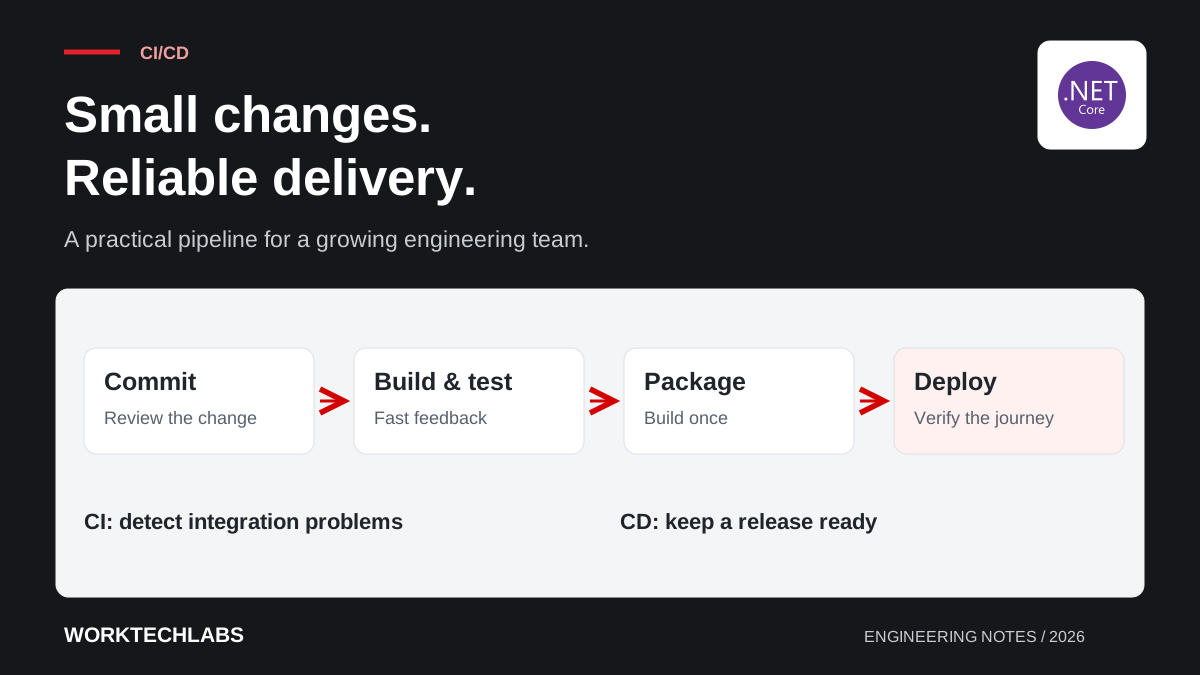
A first pipeline for a .NET application can restore dependencies, compile the solution, run relevant automated tests and produce a versioned package. Run it for proposed changes before merging and again for the shared release branch. Keep the steps in version control so changes to the process receive the same review as application code.
Give failures clear ownership. A broken build should interrupt the addition of unrelated work until the team understands the cause. Otherwise, several changes accumulate on top of an unhealthy baseline and the next developer must diagnose a much larger problem. Fast feedback only helps when someone acts on it.
The pipeline should work without relying on a particular laptop. Record required SDK versions and dependencies, and make configuration requirements explicit. When a clean environment can build the application, onboarding, incident recovery and future migration become easier as well. Those benefits matter even before the team automates production deployment.
Keep feedback fast and trustworthy
Separate checks by purpose. Fast tests of business rules belong early because developers need feedback while a change is still fresh in their minds. Integration checks verify that components cooperate with databases or services. A smaller number of end-to-end checks can exercise critical journeys through the running application.
Choose realistic test data without using unrestricted copies of production information. Include boundary conditions: empty imports, unusual dates, large orders and users with limited permissions. A test environment containing only ideal records can make a fragile release look convincing.
Treat intermittent failures as maintenance work. When a team learns to rerun a failed job until it turns green, the signal loses credibility. Investigate timing assumptions, shared state and unstable dependencies. A temporarily isolated unreliable test needs a tracked owner and a repair date so it does not disappear from the quality process indefinitely.
Protect the path to production
The pipeline is also an access path. It may retrieve packages, use credentials and deploy to production. Give build and deployment identities only the access they need, scope sensitive values to the appropriate environment and prevent untrusted proposed changes from receiving production credentials.
Review workflow changes carefully because they can alter what runs with those permissions. Keep an audit trail connecting the approving person, source revision and deployed package. If your hosting provider supports identity-based access, assess it as an alternative to long-lived secrets that must be stored and rotated.
Dependency and secret checks can add useful evidence, but their results require handling rules. Decide which findings block a release, how exceptions are approved and who tracks remediation. A pipeline that reports hundreds of ignored warnings is difficult to trust, even when the most serious warning appears somewhere in the output.
Promote a tested package through the environments
Once the build produces a package, use the same identifiable artefact for subsequent deployment stages. Environment-specific settings should be supplied separately. This allows the team to say that production received the version approved in staging, rather than a new build that happens to use the same source code.
Run meaningful checks after deployment and record the result. If a deployment changes a database, explain how it remains compatible with application versions that may overlap. The pipeline can execute a migration, but it cannot make an unsafe schema change safe simply by automating it. The article on recoverable deployments explores that distinction.
Keep the manual approval focused on evidence: the intended change, test results, operational impact and recovery route. An approval button that nobody has time to evaluate adds waiting without adding much assurance.
Measure whether delivery is getting easier
Begin with a few questions the team can answer consistently. How long does a ready change wait for release? How often does deployment require an undocumented intervention? How much time is spent diagnosing pipeline failures? When a release causes a problem, how quickly can the team restore useful service?
Use those answers to improve the process rather than rank individual developers. A delay might come from unclear acceptance criteria, unavailable environments or a review queue, not slow coding. CI/CD makes these constraints visible; it does not remove them automatically.
For the next iteration, choose one recurring source of uncertainty and automate a check or a repeatable step around it. Worktechlabs supports .NET delivery and independent code reviews that help teams connect their pipeline to the behaviour customers depend on. A modest, trusted process is a useful foundation for growth.
